Category: Uncategorized

  • Documentation That Decays at the Speed of Code

    Documentation That Decays at the Speed of Code

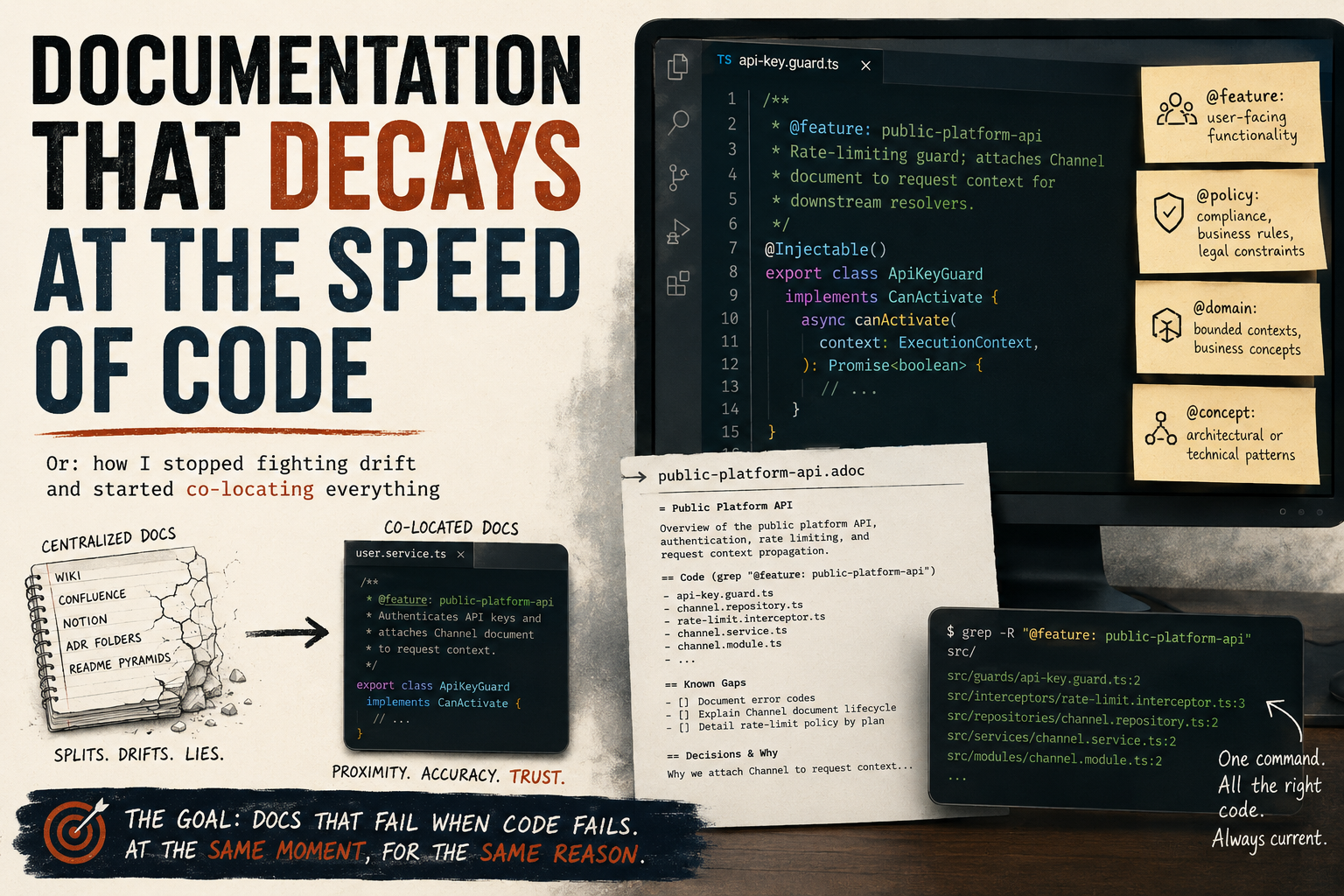
    Or: how I stopped fighting drift and started co-locating everything


    I’ve tried the wiki. I’ve tried Confluence. I’ve tried Notion, README pyramids, ADR folders, and elaborate comment conventions nobody followed after month two. Every single time, the documentation and the code split apart like tectonic plates — slowly at first, then catastrophically.

    The problem isn’t the tools. The problem is that centralized documentation trusts the wrong thing. It trusts that someone will remember to update the wiki when they rename a service. They won’t. It trusts that the architecture diagram stays current after a refactor. It doesn’t. You’ve built a second system that describes the first system, and the second one is always lying.

    About a year ago I stopped trying to solve documentation and started trying to solve decay rate.


    The Insight That Changed How I Think About This

    Documentation doesn’t fail because people are lazy. It fails because the cost of keeping it accurate is paid by a different person than the one who breaks it. The developer who refactors a module has zero incentive to update a Confluence page three directories away. The doc rots silently. Nobody notices until a new team member makes a decision based on something that stopped being true six months ago.

    So I asked a different question: what if the documentation could only be wrong in exactly the same way the code is wrong?

    That’s the goal. Not perfect docs. Docs that fail loudly, at the same moment, for the same reason the code fails. Docs that are wrong when the code is wrong and right when the code is right — because they live inside the code, not beside it.


    The System: Tags and Almost Nothing Else

    The implementation is embarrassingly simple. You add a JSDoc-style tag to the class or function that owns a concept:

    /**
     * @feature: public-platform-api
     * Rate-limiting guard; attaches Channel document to request context for downstream resolvers.
     */
    @Injectable()
    export class ApiKeyGuard implements CanActivate {
    JavaScript

    That’s it. The tag name is your index key. grep "@feature: public-platform-api" returns every file that participates in that feature, with the code right there. No navigation hierarchy. No link rot. No file-list tables that go stale the moment someone moves a file.

    Four tag categories cover almost everything:

    • @feature: — user-facing functionality
    • @policy: — compliance, business rules, legal constraints
    • @domain: — bounded contexts, business concepts
    • @concept: — architectural or technical patterns

    You write a short .adoc file for each tag. But the adoc does almost no work — it lists the tag names that exist, gives a one-paragraph overview, and documents known gaps: things not yet implemented, decisions that can’t be inferred from the code, the “why” behind an unusual constraint.

    Everything else lives at the tag location.


    Why This Works Especially Well for AI Workflows

    I didn’t design this for AI. I designed it because I was tired of outdated docs. But it turns out the same property that makes tags durable for humans makes them excellent for AI agents.

    When an AI code assistant needs to understand a feature, it has two options: scan the whole codebase speculatively, or follow a precise trail. Tags give it the trail. grep "@feature: public-platform-api" returns every relevant file in one pass. The AI gets the code and the one-sentence context together — not a decontextualized chunk from a vector database, but the actual implementation with its own explanation attached.

    Compare that to the alternatives:

    Wikis — the AI reads docs that may not reflect the current code. It then has to reconcile them.

    Vector databases — fast semantic search, but you’ve now created an ingestion pipeline, embedding model versioning, sync triggers, and a system that returns chunks stripped of their structural context. You’re maintaining infrastructure to approximate what grep already does exactly.

    Raw codebase scanning — works fine, but an AI reading 300 files to understand one feature is burning tokens on boilerplate. Tags compress that.

    The co-location approach means the “index” is always current. It can’t drift ahead of the code because it’s compiled into the same file.


    This Is Not a Dogma

    I want to be clear about something: this is not the One True Way to document software. It’s the approach that’s working best for me right now, for this kind of codebase, with this kind of team.

    If you’re building a public API that external developers depend on, you need proper API reference docs — generated, versioned, published. Use Swagger, use TypeDoc, use whatever produces something your consumers can navigate without reading your source code.

    If you’re writing a library with a stable public surface, a proper README and examples file matters more than internal tags.

    If your team doesn’t use an AI assistant and all your developers are deeply familiar with the codebase, a lighter convention might serve you just as well.

    The point isn’t the tags. The point is proximity. Keep explanations close to the thing being explained, and they’ll stay accurate. The specific mechanism is secondary.

    What I’m arguing against is the instinct to reach for a centralized documentation system as the default — the wiki, the ADR folder, the elaborate Confluence hierarchy — when the code is already the most accurate record you have.


    Q&A: The Objections Worth Taking Seriously

    I stress-tested this methodology by asking an AI to roast it. These are the strongest counterarguments and my honest responses.


    “This is just comments. You invented a naming convention and called it a methodology.”

    Partially fair. The value isn’t the tag syntax — it’s the discipline of tagging at the right granularity and writing adoc files that document only what the code can’t. A good comment already does half the job. The tag adds grep-ability and a forcing function: once you have a tag name, you have a concept worth naming, and named concepts get consistent treatment. But yes — if your team already writes excellent inline comments and maintains a clean README, the marginal value here is lower.


    “Co-location doesn’t prevent drift. Your adoc files are centralized docs.”

    True, and this is the most honest criticism. The adoc files are a centralized layer, and they will drift. The design tries to minimize that by keeping adocs thin — they list tags and document gaps, not implementation details. The more you put in the adoc, the more it drifts. The less you put in it, the more durable it is. If an adoc starts growing large, that’s a signal that implementation detail is leaking out of the code and into the doc — push it back.


    “No one will actually do this consistently under deadline pressure.”

    Also fair. Any discipline-dependent system degrades under pressure. My partial answer: the activation energy is low enough that a tag + sentence gets added even when a developer is rushing, whereas a wiki update gets skipped entirely. But I don’t have a mechanical enforcement story. A linter that checks for untagged exports would help here; I haven’t built one. If your team culture doesn’t support even minimal tagging, this system won’t save you.


    “You rejected the vector DB but you’re still doing manual vector DB work.”

    The adoc files are a hand-curated index, yes. The difference is that hand-curated indexes are human-readable and don’t require infrastructure. The goal of a vector DB is to make semantic search possible without knowing the tag name. That’s a real need — but it’s solved more cheaply by having discoverable adoc files that list all tags. If you need semantic search over documentation, you probably have a larger codebase than this methodology targets.


    “An AI can already scan a codebase without your tags.”

    It can, and for well-structured code it does this reasonably well. The tags are a compression layer, not a prerequisite. Without them, the AI reads more files and does more inference. With them, it follows a precise trail. At small scale, the difference is negligible. At larger scale — or when onboarding AI agents to a codebase they haven’t seen before — the reduction in speculative reads matters.


    “‘Low tooling’ is false advertising. You still need conventions, adoc files, and grep discipline.”

    Fair reframe. “Low tooling” means no servers, no databases, no ingestion pipelines, no sync jobs. You do need conventions and discipline — those are always the real infrastructure cost of any documentation system. The claim is that the mechanical overhead is lower, not that the human overhead is zero.


    The Part I Actually Believe

    Every documentation system eventually answers one question: what do you trust?

    Wikis trust that someone updates them. Vector databases trust that ingestion pipelines stay in sync and embeddings remain meaningful as the codebase evolves. AI agents trust that the model has enough context to fill in what isn’t written.

    This system trusts the code. The tag is wrong in exactly the same way the code is wrong. It fails loudly, at the same moment, for the same reason — because it’s in the same file, committed in the same PR, reviewed by the same eyes.

    That’s not a perfect guarantee. It’s just a better failure mode.

    Use the best tool for the job. But default to proximity.
  • Transitions Are First-Class: The Case for Explicit State Machines

    Transitions Are First-Class: The Case for Explicit State Machines

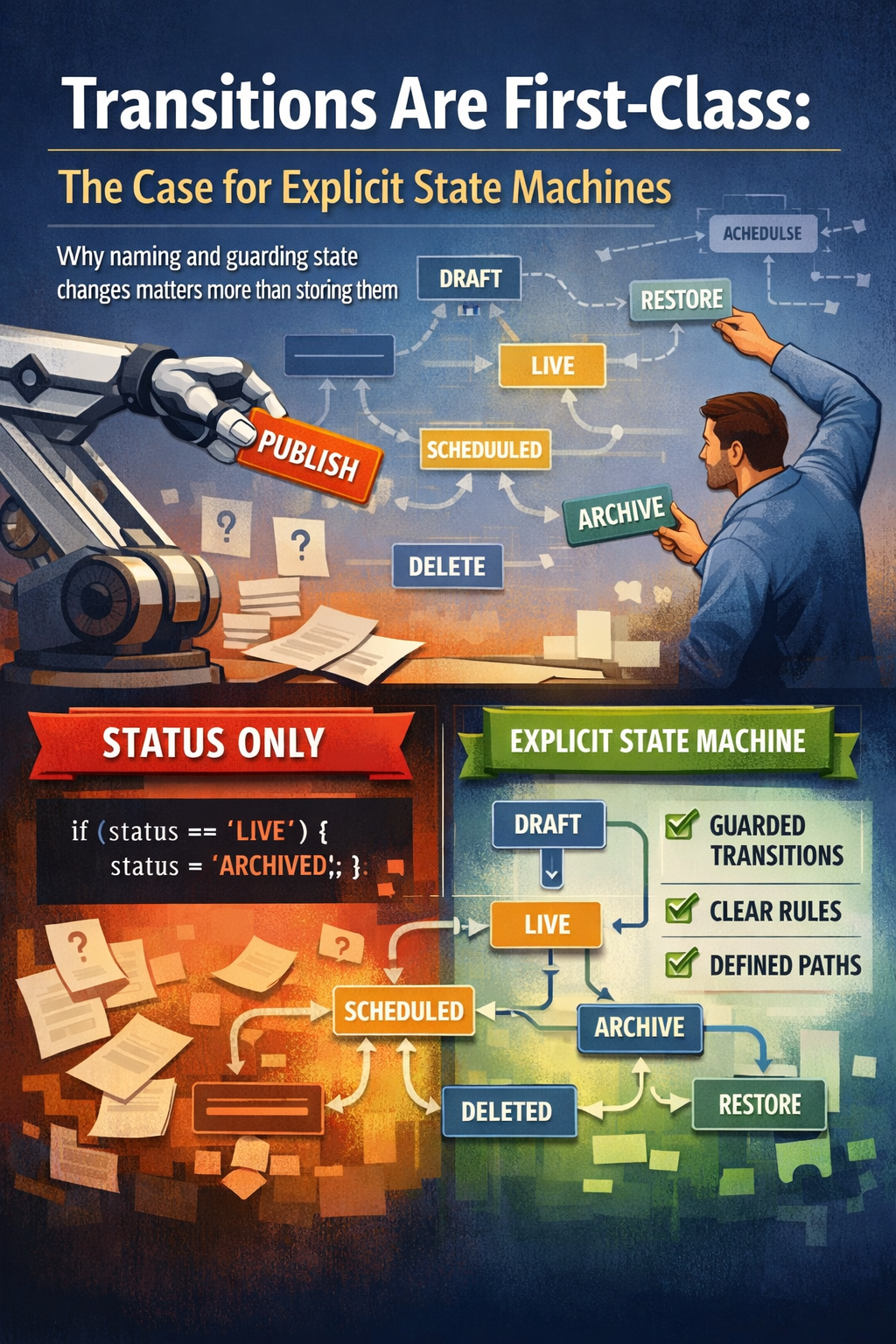
    On why naming and guarding state changes matters more than storing them.


    The Common Approach

    Most systems manage entity state the same way: a status field, a handful of conditional checks, and a save. It works. It’s simple to explain. And it quietly causes problems at scale that are hard to trace back to the original design decision.

    // The common approach — status is just a field you write to
    async publishVacancy(vacancyId: string) {
      const vacancy = await this.vacancyRepo.findById(vacancyId);
    
      if (vacancy.status !== 'DRAFT') {
        throw new Error('Cannot publish');
      }
    
      vacancy.status = 'LIVE'; // directly mutated
      await this.vacancyRepo.save(vacancy);
    }
    JavaScript

    This is fine for one transition. But as the number of states and transitions grows, this pattern spreads validation logic across every service that touches the entity. The status field becomes a shared mutable value that anyone can write to, from anywhere. The rules about what’s allowed live in whichever function happened to check them — or don’t live anywhere at all.


    Status and Transition Are Different Things

    The core insight is that status and transition are two distinct concepts that most codebases treat as one.

    Status is a passive record. It describes where an entity currently is. It answers the question: what state is this in right now?

    A transition is an active, named operation. It describes a deliberate move from one state to another. It answers: what is happening to this entity, and is it allowed from where it currently is?

    When you only model status, transitions exist implicitly — scattered across services as if (status === 'X') { status = 'Y' } — but they have no name, no single location, no enforced contract, and no way to ask the system “what can I actually do with this thing right now?”

    When you model transitions explicitly, they become part of your domain language. PUBLISH, ARCHIVE, RESTORE, SCHEDULE — these are operations with meaning, guards, and consequences. Not just writes to a field.

    Here’s the full picture of what that looks like as a graph:

    stateDiagram-v2
        [*] --> DRAFT : created
    
        DRAFT --> SCHEDULED : SCHEDULE
        DRAFT --> LIVE : PUBLISH
        DRAFT --> DELETED : DELETE
    
        SCHEDULED --> DRAFT : UNSCHEDULE
        SCHEDULED --> LIVE : SCHEDULED_PUBLISH (cron)
        SCHEDULED --> ARCHIVED : ARCHIVE
    
        LIVE --> DRAFT : UNPUBLISH
        LIVE --> LIVE : CORRECT_OR_REPUBLISH
        LIVE --> LIVE : AUTO_REPUBLISH (cron)
        LIVE --> ARCHIVED : ARCHIVE
    
        ARCHIVED --> DRAFT : RESTORE
    
        DELETED --> [*]

    Two things stand out immediately in this diagram that a status enum alone would never reveal: CORRECT_OR_REPUBLISH and AUTO_REPUBLISH are both LIVE → LIVE operations — the status doesn’t change at all, yet something meaningful and distinct is happening. They would be completely invisible in a direct-mutation model.


    A Real Example

    A vacancy moves through five states: DRAFT, SCHEDULED, LIVE, ARCHIVED, DELETED. In the naive model those are just string values in a status column. But what is actually happening is a set of named, directional operations:

    export enum VacancyStatusTransitionEnum {
      SCHEDULE = 'SCHEDULE',                         // DRAFT → SCHEDULED
      UNSCHEDULE = 'UNSCHEDULE',                     // SCHEDULED → DRAFT
      SCHEDULED_PUBLISH = 'SCHEDULED_PUBLISH',       // SCHEDULED → LIVE  (cron only)
      PUBLISH = 'PUBLISH',                           // DRAFT → LIVE
      UNPUBLISH = 'UNPUBLISH',                       // LIVE → DRAFT
      CORRECT_OR_REPUBLISH = 'CORRECT_OR_REPUBLISH', // LIVE → LIVE
      AUTO_REPUBLISH = 'AUTO_REPUBLISH',             // LIVE → LIVE       (cron only)
      ARCHIVE = 'ARCHIVE',                           // LIVE | SCHEDULED → ARCHIVED
      RESTORE = 'RESTORE',                           // ARCHIVED → DRAFT
      DELETE = 'DELETE',                             // DRAFT → DELETED
    }
    JavaScript

    Notice what this enum tells you that the status enum never could: the direction of movement, the intent behind each change, and which operations exist at all. The state machine then makes the allowed paths explicit in a single constraint table:

    public stateConstraints: StateConstraints = {
      [VacancyStatusTransitionEnum.SCHEDULE]: {
        from: [VacancyStatusEnum.DRAFT],
        to:   [VacancyStatusEnum.SCHEDULED],
      },
      [VacancyStatusTransitionEnum.PUBLISH]: {
        from: [VacancyStatusEnum.DRAFT],
        to:   [VacancyStatusEnum.LIVE],
      },
      [VacancyStatusTransitionEnum.ARCHIVE]: {
        from: [VacancyStatusEnum.LIVE, VacancyStatusEnum.SCHEDULED],
        to:   [VacancyStatusEnum.ARCHIVED],
      },
      [VacancyStatusTransitionEnum.RESTORE]: {
        from: [VacancyStatusEnum.ARCHIVED],
        to:   [VacancyStatusEnum.DRAFT],
      },
      // ...
    };
    JavaScript

    There is now exactly one place to look to understand what state changes are possible in this system. No archaeology across services required.


    What You Get From the Explicit Model

    1. The guard lives once

    Every transition is checked through a single canTransition() method. You cannot accidentally publish an archived vacancy because you forgot to add a check in a new service — the machine rejects it regardless of where the call originates.

    public canTransition(
      transition: VacancyStatusTransitionEnum,
      vacancy: Vacancy,
    ) {
      const statusConstraints = this.stateConstraints[transition];
      return statusConstraints.from.includes(vacancy.status);
    }
    JavaScript

    2. Transition-specific validation

    Each transition carries its own validation logic, completely isolated from every other transition’s rules. Scheduling requires a future publishByDate. Publishing from draft does not. These are different operations — they deserve different rules, and those rules should not bleed into each other.

    // Only enforced for SCHEDULE — not carried by any other transition
    if (
      !vacancy?.uniBaseX?.publishByDate ||
      vacancy?.uniBaseX?.publishByDate < new Date()
    ) {
      throw new Error('Vacancy must have a publishByDate in the future!');
    }
    JavaScript

    In a direct-mutation approach this kind of validation either gets duplicated across call sites or centralised into something that makes every operation carry rules that don’t apply to it.

    3. The status field is never directly written

    This is the contract the pattern enforces. Nothing outside the state machine ever sets vacancy.status = something. The status changes as a consequence of a transition, not as a goal of a controller or resolver. That means the status is always the result of a known, validated operation — never an arbitrary write.

    async transition(
      transition: VacancyStatusTransitionEnum,
      vacancy: VacancyDocument,
      user: TenantUser,
    ) {
      if (!this.canTransition(transition, vacancy)) {
        throw new Error(
          `Transition ${transition} not allowed from status: ${vacancy.status}`
        );
      }
    
      // status is only ever set inside the individual transition methods below
      switch (transition) {
        case VacancyStatusTransitionEnum.PUBLISH:
          return this.publish(vacancy, user);
        case VacancyStatusTransitionEnum.ARCHIVE:
          return this.archive(vacancy);
        case VacancyStatusTransitionEnum.RESTORE:
          return this.restore(vacancy, user);
        // ...
      }
    }
    JavaScript

    4. The API can tell clients what is possible

    Because available transitions are computable from current state, the API can proactively expose them. The client does not need to know the rules — it asks the server what actions are available and renders accordingly.

    // A field resolver on the vacancy type
    availableTransitions(vacancy: Vacancy) {
      return this.stateMachine.getAvailableTransitions(vacancy);
    }
    JavaScript

    The UI receives something like ['PUBLISH', 'SCHEDULE', 'DELETE'] and renders exactly those buttons — no client-side business logic, no duplicated rules, no buttons showing up that would fail the moment they are clicked. The source of truth is the server, and it communicates it proactively.

    Here is what that looks like from the client’s perspective for a vacancy currently in DRAFT:

    stateDiagram-v2
        state "DRAFT (current)" as DRAFT
    
        DRAFT --> SCHEDULED : ✅ SCHEDULE (available)
        DRAFT --> LIVE : ✅ PUBLISH (available)
        DRAFT --> DELETED : ✅ DELETE (available)
    
        state "Not available from DRAFT" as blocked {
            UNPUBLISH : ❌ UNPUBLISH
            ARCHIVE : ❌ ARCHIVE
            RESTORE : ❌ RESTORE
        }

    5. Vocabulary alignment with the business

    When a product manager says “we need to archive this vacancy”, that maps directly to ARCHIVE. When they ask “can we restore it after that?”, you look at the constraint table and answer immediately: yes, RESTORE is allowed from ARCHIVED. The code speaks the same language as the conversation, which makes requirements easier to translate and bugs easier to locate.


    “Isn’t This Overengineering?”

    For a two-state toggle — yes. If something is either active or inactive and that is the full extent of it, a state machine is ceremony without payoff.

    The pattern earns its complexity the moment:

    • More than ~3 states exist — the graph of allowed transitions becomes non-trivial to reason about
    • Not all transitions are valid from all states — you need enforced guards, not assumptions
    • Different transitions require different validation — one operation’s rules should not bleed into another’s
    • The client needs to know what is possible — without duplicating backend rules in the frontend
    • Auditability matters — transitions are named, loggable events; status mutations are just field writes

    The perceived overengineering usually comes from seeing the extra enum, the extra service, the extra indirection. What is harder to see is the complexity being prevented: the conditional checks scattered across unrelated services, the frontend logic duplicating backend rules, the bug where an archived vacancy somehow ended up live again because someone wrote directly to the status field in a migration script.


    Transitions as Actions

    One framing that tends to land well in practice: think of transitions as actions.

    A “Publish” button in the UI is not “set status to LIVE”. It is performing the PUBLISH action. That action has preconditions (must be in DRAFT), effects (status becomes LIVE, a publication snapshot is created, job board channels are activated), and a name that the whole team understands. The state machine is the thing that makes that action explicit, enforceable, and discoverable.

    The status field is where you ended up. The transition is what you did to get there. Both matter — but the transition is the one that carries the logic, and it deserves a proper home in the codebase rather than being implied by scattered if-statements.

    Here is the full lifecycle one more time, this time annotated with which transitions are human-initiated and which are system-initiated:

    stateDiagram-v2
        [*] --> DRAFT : created
    
        DRAFT --> SCHEDULED : SCHEDULE 👤
        DRAFT --> LIVE : PUBLISH 👤
        DRAFT --> DELETED : DELETE 👤
    
        SCHEDULED --> DRAFT : UNSCHEDULE 👤
        SCHEDULED --> LIVE : SCHEDULED_PUBLISH 🤖 cron
        SCHEDULED --> ARCHIVED : ARCHIVE 👤
    
        LIVE --> DRAFT : UNPUBLISH 👤
        LIVE --> LIVE : CORRECT_OR_REPUBLISH 👤
        LIVE --> LIVE : AUTO_REPUBLISH 🤖 cron
        LIVE --> ARCHIVED : ARCHIVE 👤
    
        ARCHIVED --> DRAFT : RESTORE 👤
    
        DELETED --> [*]

    The distinction between human-initiated (👤) and system-initiated (🤖) transitions is something a plain status field cannot express at all — yet it is operationally important. A SCHEDULED_PUBLISH that happens automatically at 08:00 needs different logging, different error handling, and different alerting than a manual PUBLISH triggered by a recruiter. Naming them as separate transitions makes that distinction enforceable.


    The status field tells you where an entity is. Transitions tell you how it got there, what got checked along the way, and where it is allowed to go next. That is a lot of value to leave implicit.