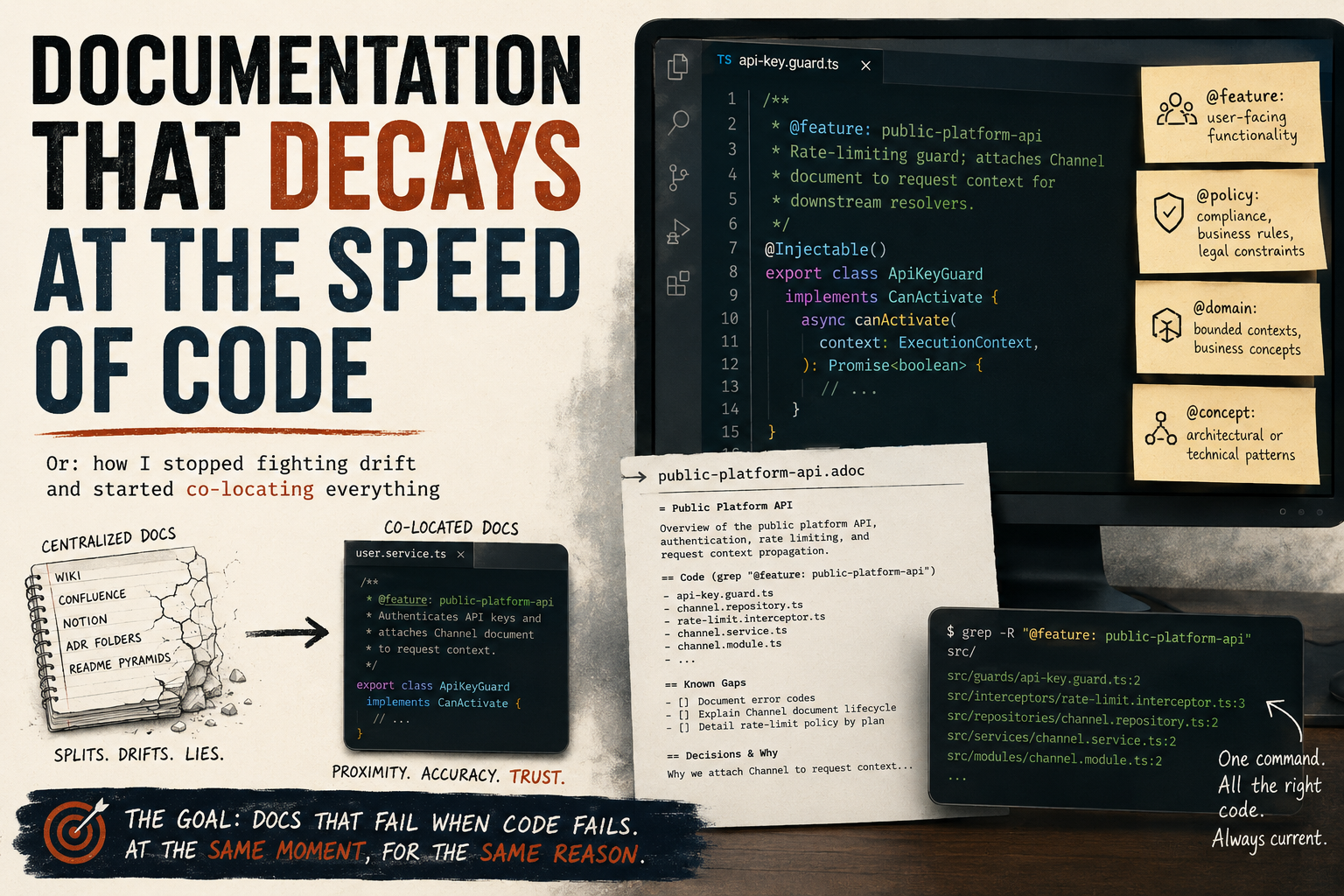
Or: how I stopped fighting drift and started co-locating everything
I’ve tried the wiki. I’ve tried Confluence. I’ve tried Notion, README pyramids, ADR folders, and elaborate comment conventions nobody followed after month two. Every single time, the documentation and the code split apart like tectonic plates — slowly at first, then catastrophically.
The problem isn’t the tools. The problem is that centralized documentation trusts the wrong thing. It trusts that someone will remember to update the wiki when they rename a service. They won’t. It trusts that the architecture diagram stays current after a refactor. It doesn’t. You’ve built a second system that describes the first system, and the second one is always lying.
About a year ago I stopped trying to solve documentation and started trying to solve decay rate.
The Insight That Changed How I Think About This
Documentation doesn’t fail because people are lazy. It fails because the cost of keeping it accurate is paid by a different person than the one who breaks it. The developer who refactors a module has zero incentive to update a Confluence page three directories away. The doc rots silently. Nobody notices until a new team member makes a decision based on something that stopped being true six months ago.
So I asked a different question: what if the documentation could only be wrong in exactly the same way the code is wrong?
That’s the goal. Not perfect docs. Docs that fail loudly, at the same moment, for the same reason the code fails. Docs that are wrong when the code is wrong and right when the code is right — because they live inside the code, not beside it.
The System: Tags and Almost Nothing Else
The implementation is embarrassingly simple. You add a JSDoc-style tag to the class or function that owns a concept:
/**
 * @feature: public-platform-api
 * Rate-limiting guard; attaches Channel document to request context for downstream resolvers.
 */
@Injectable()
export class ApiKeyGuard implements CanActivate {That’s it. The tag name is your index key. grep "@feature: public-platform-api" returns every file that participates in that feature, with the code right there. No navigation hierarchy. No link rot. No file-list tables that go stale the moment someone moves a file.
Four tag categories cover almost everything:
@feature:— user-facing functionality@policy:— compliance, business rules, legal constraints@domain:— bounded contexts, business concepts@concept:— architectural or technical patterns
You write a short .adoc file for each tag. But the adoc does almost no work — it lists the tag names that exist, gives a one-paragraph overview, and documents known gaps: things not yet implemented, decisions that can’t be inferred from the code, the “why” behind an unusual constraint.
Everything else lives at the tag location.
Why This Works Especially Well for AI Workflows
I didn’t design this for AI. I designed it because I was tired of outdated docs. But it turns out the same property that makes tags durable for humans makes them excellent for AI agents.
When an AI code assistant needs to understand a feature, it has two options: scan the whole codebase speculatively, or follow a precise trail. Tags give it the trail. grep "@feature: public-platform-api" returns every relevant file in one pass. The AI gets the code and the one-sentence context together — not a decontextualized chunk from a vector database, but the actual implementation with its own explanation attached.
Compare that to the alternatives:
Wikis — the AI reads docs that may not reflect the current code. It then has to reconcile them.
Vector databases — fast semantic search, but you’ve now created an ingestion pipeline, embedding model versioning, sync triggers, and a system that returns chunks stripped of their structural context. You’re maintaining infrastructure to approximate what grep already does exactly.
Raw codebase scanning — works fine, but an AI reading 300 files to understand one feature is burning tokens on boilerplate. Tags compress that.
The co-location approach means the “index” is always current. It can’t drift ahead of the code because it’s compiled into the same file.
This Is Not a Dogma
I want to be clear about something: this is not the One True Way to document software. It’s the approach that’s working best for me right now, for this kind of codebase, with this kind of team.
If you’re building a public API that external developers depend on, you need proper API reference docs — generated, versioned, published. Use Swagger, use TypeDoc, use whatever produces something your consumers can navigate without reading your source code.
If you’re writing a library with a stable public surface, a proper README and examples file matters more than internal tags.
If your team doesn’t use an AI assistant and all your developers are deeply familiar with the codebase, a lighter convention might serve you just as well.
The point isn’t the tags. The point is proximity. Keep explanations close to the thing being explained, and they’ll stay accurate. The specific mechanism is secondary.
What I’m arguing against is the instinct to reach for a centralized documentation system as the default — the wiki, the ADR folder, the elaborate Confluence hierarchy — when the code is already the most accurate record you have.
Q&A: The Objections Worth Taking Seriously
I stress-tested this methodology by asking an AI to roast it. These are the strongest counterarguments and my honest responses.
“This is just comments. You invented a naming convention and called it a methodology.”
Partially fair. The value isn’t the tag syntax — it’s the discipline of tagging at the right granularity and writing adoc files that document only what the code can’t. A good comment already does half the job. The tag adds grep-ability and a forcing function: once you have a tag name, you have a concept worth naming, and named concepts get consistent treatment. But yes — if your team already writes excellent inline comments and maintains a clean README, the marginal value here is lower.
“Co-location doesn’t prevent drift. Your adoc files are centralized docs.”
True, and this is the most honest criticism. The adoc files are a centralized layer, and they will drift. The design tries to minimize that by keeping adocs thin — they list tags and document gaps, not implementation details. The more you put in the adoc, the more it drifts. The less you put in it, the more durable it is. If an adoc starts growing large, that’s a signal that implementation detail is leaking out of the code and into the doc — push it back.
“No one will actually do this consistently under deadline pressure.”
Also fair. Any discipline-dependent system degrades under pressure. My partial answer: the activation energy is low enough that a tag + sentence gets added even when a developer is rushing, whereas a wiki update gets skipped entirely. But I don’t have a mechanical enforcement story. A linter that checks for untagged exports would help here; I haven’t built one. If your team culture doesn’t support even minimal tagging, this system won’t save you.
“You rejected the vector DB but you’re still doing manual vector DB work.”
The adoc files are a hand-curated index, yes. The difference is that hand-curated indexes are human-readable and don’t require infrastructure. The goal of a vector DB is to make semantic search possible without knowing the tag name. That’s a real need — but it’s solved more cheaply by having discoverable adoc files that list all tags. If you need semantic search over documentation, you probably have a larger codebase than this methodology targets.
“An AI can already scan a codebase without your tags.”
It can, and for well-structured code it does this reasonably well. The tags are a compression layer, not a prerequisite. Without them, the AI reads more files and does more inference. With them, it follows a precise trail. At small scale, the difference is negligible. At larger scale — or when onboarding AI agents to a codebase they haven’t seen before — the reduction in speculative reads matters.
“‘Low tooling’ is false advertising. You still need conventions, adoc files, and grep discipline.”
Fair reframe. “Low tooling” means no servers, no databases, no ingestion pipelines, no sync jobs. You do need conventions and discipline — those are always the real infrastructure cost of any documentation system. The claim is that the mechanical overhead is lower, not that the human overhead is zero.
The Part I Actually Believe
Every documentation system eventually answers one question: what do you trust?
Wikis trust that someone updates them. Vector databases trust that ingestion pipelines stay in sync and embeddings remain meaningful as the codebase evolves. AI agents trust that the model has enough context to fill in what isn’t written.
This system trusts the code. The tag is wrong in exactly the same way the code is wrong. It fails loudly, at the same moment, for the same reason — because it’s in the same file, committed in the same PR, reviewed by the same eyes.
That’s not a perfect guarantee. It’s just a better failure mode.
Use the best tool for the job. But default to proximity.